


Description
Download Morning Coffee Extension – Organize Daily Web Readings Free Secure Firefox Add‑on
Overview
If you start every workday with a ritualistic cup of coffee, you probably have a set of web pages that you check as soon as the browser opens – news sites, tech blogs, project dashboards, or even a favorite video‑game magazine. Morning Coffee Extension transforms that habit into a smooth, automated experience. Built for the Firefox browser, this free add‑on acts like a smart folder on your bookmarks toolbar, but with the added power to group tabs by the day of the week. Imagine a “weekday coffee” that opens your industry newsletters, a “weekend coffee” that launches entertainment sites, and a “holiday coffee” for special content. The extension remembers the schedule, opens the right tabs with a single click, and saves you the mental overhead of remembering which pages belong where. While the developers are still working on an auto‑launch‑on‑startup feature, the current version already delivers a reliable, secure way to keep your daily reading list tidy. Whether you are a journalist, a developer, a student, or just a web‑savvy coffee lover, Morning Coffee Extension offers a focused, distraction‑free start to every browsing session.
Core Features
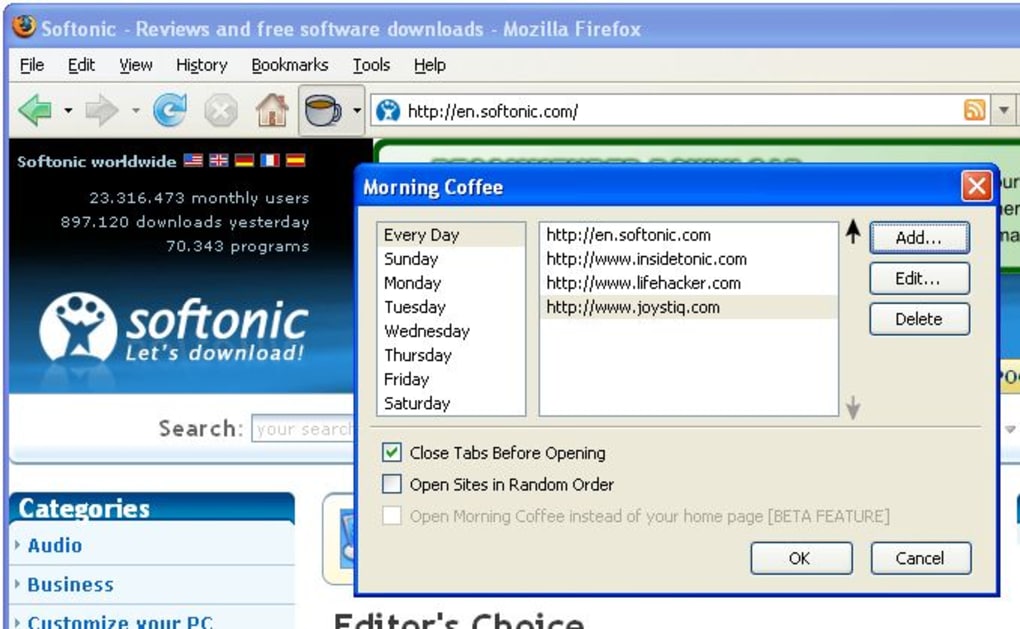
- Day‑Based Tab Groups – Create separate collections for Monday‑Friday, Saturday‑Sunday, or any custom schedule you prefer.
- One‑Click Opening – Launch all tabs in a group with a single click, eliminating the need to open each bookmark individually.
- Drag‑and‑Drop Organization – Rearrange sites inside a group just like you would in a regular folder, making updates intuitive.
- Sync Across Devices – When you sign into Firefox Sync, your Morning Coffee groups travel with you to any device where the extension is installed.
- Custom Naming & Icons – Assign friendly names and optional icons to each group, so you can spot “Weekend Coffee” at a glance.
- Lightweight & Secure – The extension runs with minimal memory footprint and follows Mozilla’s strict security guidelines.
- Future‑Ready Updates – The development roadmap includes auto‑open on browser start, cloud backup, and integration with Firefox’s built‑in “Pocket” service.
Each feature has been designed with the everyday user in mind. The day‑based grouping is particularly useful for professionals who need a predictable flow of information: a marketer might open campaign dashboards on weekdays and social‑media trend sites on weekends. Because the extension lives inside Firefox, it inherits the browser’s privacy protections, ensuring that your reading list isn’t exposed to third‑party trackers. The drag‑and‑drop interface mirrors the native bookmark manager, so there’s virtually no learning curve. Moreover, the ability to sync groups across devices means you can enjoy the same organized start on a home PC, a work laptop, or even a mobile Firefox installation on Android or iOS. All of these capabilities combine to make Morning Coffee Extension a practical, time‑saving tool that feels as comforting as the first sip of coffee in the morning.
Installation, Usage & Compatibility
How to Install
Installing Morning Coffee Extension is straightforward. Open Firefox, navigate to the official add‑on page, and click the “Add to Firefox” button. After a brief permission review (the extension only needs access to your bookmarks and tabs), confirm the installation. Firefox will automatically download and enable the extension, placing a new “☕ Morning Coffee” icon on your toolbar. No reboot or additional software is required.
First‑Time Setup
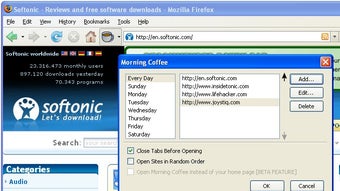
Click the icon to open the configuration panel. You’ll see an empty list where you can start adding URLs. Use the “Add New Site” field, paste the web address, and press Enter. Assign the site to a day group by selecting the appropriate checkbox (e.g., “Weekday” or “Weekend”). Continue adding as many sites as you need. When you’re ready, click “Save Group”. The group appears as a folder‑style entry beneath the icon; clicking it opens all associated tabs at once.
Practical Usage Tips
• Quick Access: Pin the Morning Coffee icon to your toolbar for a single‑click launch.
• Modify on the Fly: Drag a tab from an open window into a group to add it instantly.
• Temporarily Disable: Right‑click the icon and choose “Pause” if you need a break from the automatic opening.
• Sync Settings: Ensure you’re signed into Firefox Sync; your groups will be saved to the cloud and appear on any synced device.
Compatible with Windows, macOS, Linux, Android and iOS (Firefox for each platform). Because the extension runs inside the Firefox engine, it behaves consistently across all supported operating systems. Users on mobile devices will see a compact version of the configuration panel, but all core features—group creation, day selection, and one‑click opening—remain fully functional.
Pros, Cons & Frequently Asked Questions
Pros
- Organizes daily web reading lists by day of the week, reducing decision fatigue.
- One‑click opening of multiple tabs speeds up the start of any work session.
- Syncs effortlessly across all Firefox‑enabled devices.
- Lightweight, secure, and adheres to Mozilla’s privacy standards.
- Free to use with no hidden fees or subscriptions.
Cons
- Auto‑launch on browser start is not yet available (planned for future releases).
- Only works with Firefox; users of Chrome or Edge need a separate solution.
- Limited customization of tab‑opening order beyond the list sequence.
Frequently Asked Questions
Can I set a specific time for Morning Coffee to open?
At the moment the extension opens groups only when you click the icon. A scheduled auto‑open feature is in the development roadmap and is expected in a future update.
Is my data safe? Does the extension collect any personal information?
Morning Coffee Extension follows Mozilla’s strict privacy policies. It only accesses your bookmarks and open tabs to provide its functionality and does not transmit any personal data to external servers.
Can I share a Morning Coffee group with a colleague?
Direct sharing isn’t built‑in, but you can export the group’s URLs as a simple text file and import them on another Firefox installation.
Will the extension work on Firefox ESR (Extended Support Release)?
Yes, Morning Coffee is compatible with the current ESR versions, as long as they support WebExtensions APIs.
How do I report a bug or request a new feature?
You can file issues on the official GitHub repository linked from the add‑on page, or use the “Help & Feedback” option inside the extension’s settings panel.
Conclusion & Call to Action
Morning Coffee Extension fills a niche that many power users overlook: the need for a disciplined, day‑specific browsing routine. By bundling your favorite sites into easy‑to‑launch groups, the add‑on saves you minutes each day, cuts down on cognitive load, and lets you start every session with the same calm focus you get from a fresh cup of coffee. Its free price tag, cross‑platform compatibility, and adherence to Firefox’s security standards make it an attractive choice for anyone who values productivity without sacrificing privacy. While the lack of an auto‑launch feature is a minor drawback, the developers have shown a clear commitment to ongoing improvement, so you can expect that gap to close soon.
Ready to streamline your morning browsing ritual? Download Morning Coffee Extension today, set up your weekday and weekend groups, and experience the convenience of a perfectly organized web start. Join the growing community of users who have already turned their browser into a personal coffee bar—one click, many tabs, zero hassle.
Guides & Tutorials for Morning Coffee Extension
How to install Morning Coffee Extension
- Click the Preview / Download button above.
- Once redirected, accept the terms and click Install.
- Wait for the Morning Coffee Extension download to finish on your device.
How to use Morning Coffee Extension
This software is primarily used for its core features described above. Open the app after installation to explore its capabilities.
User Reviews for Morning Coffee Extension 0
No reviews found





